Authentication first
An access layer such as Cloudflare Access can sit in front of the service and require an authenticated identity or service credential before requests reach it.
This is where AI stops merely talking about work and can inspect or act on real systems. The architecture matters more than the prompt.
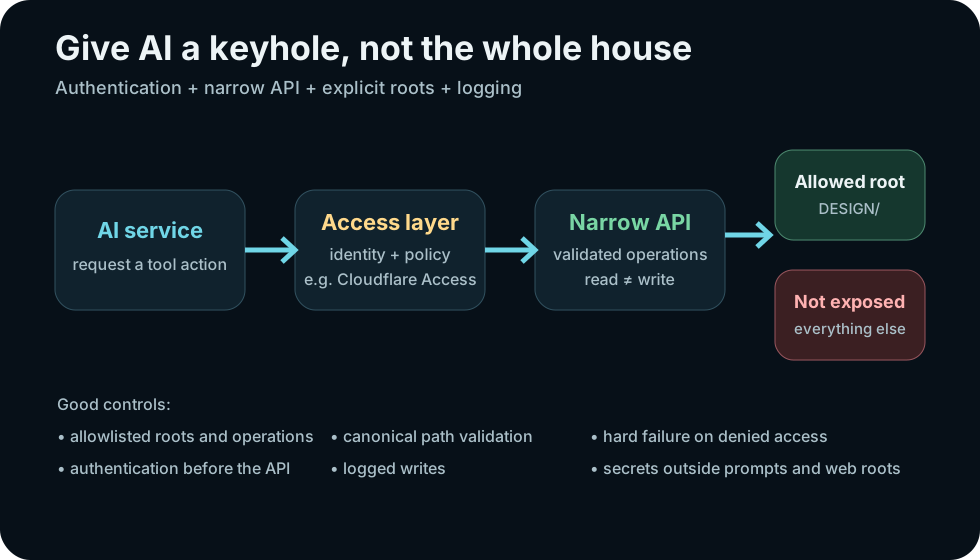
A practical advanced setup can let a hosted AI work with selected project files without exposing the whole computer.
An access layer such as Cloudflare Access can sit in front of the service and require an authenticated identity or service credential before requests reach it.
The API exposes named operations such as list, read, search or write. It should validate every requested path and operation.
The server maps simple aliases to allowlisted directories. Anything outside those roots is unavailable by construction.
The AdventureWorld arrangement used for this guide follows the principle: the AI can read configured project roots through a purpose-built file API and can write only to a separate dropbox. It does not need arbitrary filesystem access. That lets it inspect design context and deliver proposals while preserving a hard boundary around implementation ownership.
| Capability | Safer design | Avoid |
|---|---|---|
| Read files | Allowlisted roots + canonical path validation | Accepting arbitrary absolute paths |
| Write files | Separate write root or explicit writable paths | Write access wherever read access exists |
| Authentication | Identity/service token checked before API | Secret URL as the only protection |
| Failure | Deny clearly and log | Silent fallback to another path/action |
| Secrets | Server-side secret storage | Embedding keys in prompts or public JavaScript |
You have access to bounded project tools.

Before acting:
1. inspect the available roots/capabilities
2. use the least-privileged operation that can answer the question
3. read authoritative project context before reasoning about project behavior
4. never invent a file or claim to have read one you have not actually retrieved
5. if access is denied, report the boundary instead of finding a workaround

For writes:
- write only to the designated output/dropbox area
- preserve versioning and change history
- describe exactly what was written and why

Verification:
- cite the paths actually read
- verify written files through the API after creation where practical